
ONE BUTTON · ONE LED
Get your first device online.
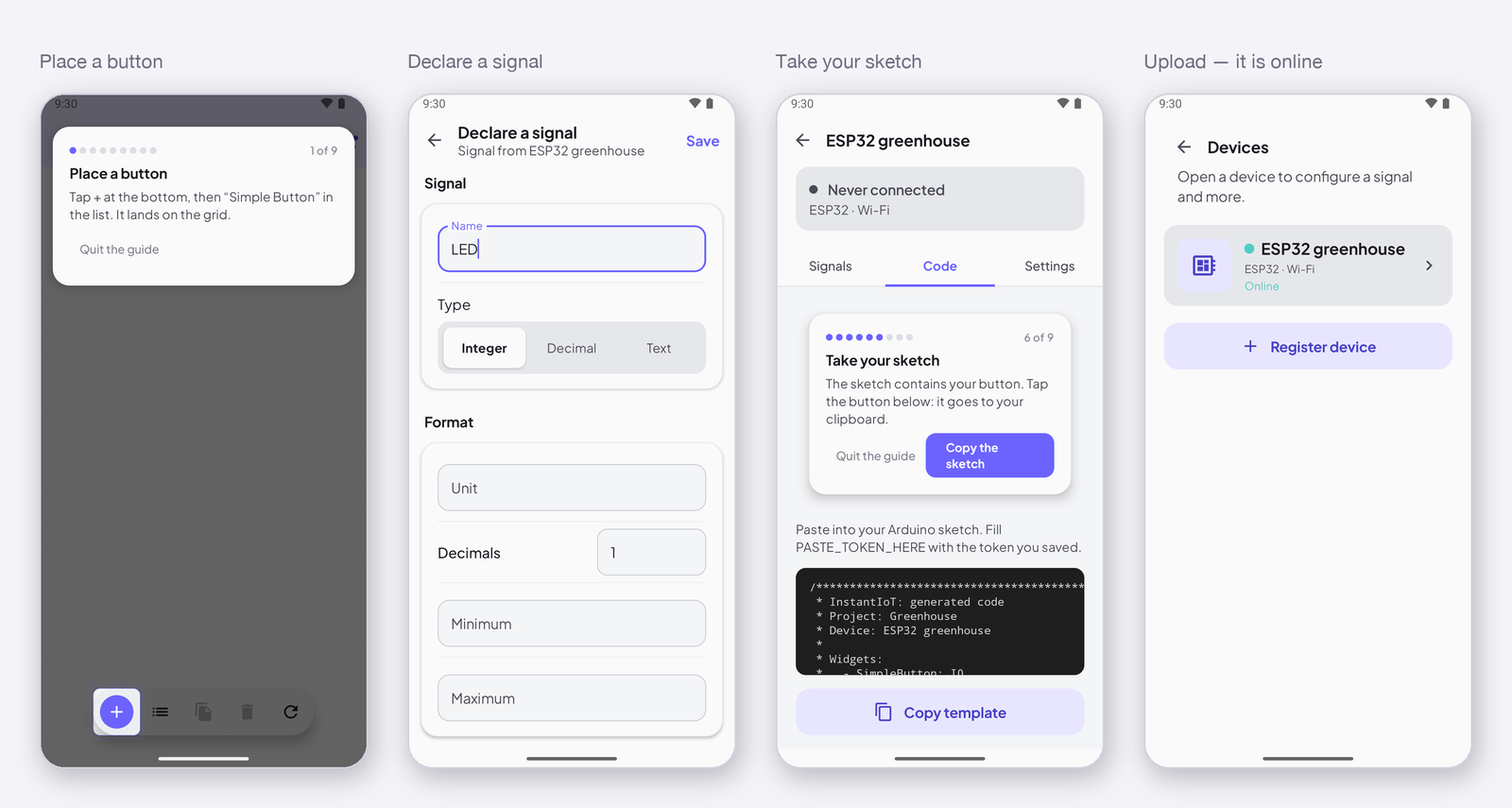
A button on your phone turns on the LED of your board. Have four things in hand. Then the app walks you through it, step by step: place a button, declare a signal, take your sketch, upload and connect.
Get the app
Free, on Android 8 and later. The first project needs no account. Create one when you want the Cloud: history, automations and notifications, from anywhere.
Install the library in the Arduino IDE
Sketch → Include Library → Manage Libraries, search InstantIoT, install. Then the core of your board, once, from Tools → Board → Boards Manager: esp32, esp8266 or the Arduino boards. That is all the setup there is.
Pick a board that runs Blink
Any board the app lists works. If you have the choice, start with an ESP32: Wi-Fi and Bluetooth built in, nothing to add.
Open the app, tap Connect your first device
The guide takes it from here, on the phone: it places the button, declares the signal, writes the sketch for your board. You paste it into the IDE, add the one line that lights the LED, and upload. Then you press. Every project after this one is the same four moves.
CLOUD, OR BLUETOOTH AND WI-FI
Not sure which one? Ask where you will be when you look at it.
Next to the device
Your phone talks straight to the board, over Bluetooth or over the Wi-Fi network the board opens. No account, no Internet, nothing to set up. A bench test, a rover, a demo. Anything you drive while you look at it.
Over the Internet
The board reaches InstantIoT Cloud through your network, by Wi-Fi or an Ethernet shield. The app reaches it from anywhere. You get the history, automations that run while the app is closed, notifications, and the same project on every phone. Free to start.
Same four moves either way. One line of the sketch changes between the two, and a project moves from one to the other whenever you like.
Start now
Which phone do you use?
The guide lives in the app. Get it, open it, tap Connect your first device.
Stuck at any step? Say so.
Makers help makers on the community. Say your board, the step and what you see. Someone will get you through it.